- What to Expect from a Laptop Under 20,000
- Who should buy a laptop under 20,000 (and who should avoid it)
- Buying Guide for Laptops Under 20,000 (India 2026)
- Best Laptops Under 20,000 in India — Editor’s Picks
- Comparison Table – Best Laptops Under 20,000
- Deep Laptop Buying Guide (Processor, RAM, Display, Storage)
- FAQs
- Best Choice Under 20K for Each Type of User
Choosing a laptop under ₹20,000 isn’t about looking for the “best” – it’s about avoiding a laptop that will slow you down, frustrate you, or become obsolete within a year.
There will always be some compromises to be made in this price range.
You’re not buying high performance; you’re buying something reliable.
You’re not buying fast speed; you’re getting basic stability.
Once you understand this, you can stop expecting too much and start focusing on what’s truly important for long-term use.
Most laptops in this price range will have some features cut back. You should opt for one with the least amount of features cut back.
Listed below are some options under ₹20,000 that offer good performance, useful features, and good value for money.
Before you spend your money, be clear about what you really need – and which ones you can ignore.
What to Expect from a Laptop Under 20,000
Budget laptops operate on a simple principle – they can do basic tasks, but they can’t offer high performance.
Here’s a simple truth that not many people talk about:
- Processors are basic. Unless you opt for something like the Helio G99, you’re most likely going to get a Celeron or an entry-level mobile chip.
- RAM is more important than the processor. Anything less than 8GB of RAM is slow these days.
- The storage type makes a huge difference. SSD or UFS are 5 times faster than HDD.
- The display may not be premium quality. But an IPS panel is a nice improvement.
- Battery life is mediocre – around 5 to 7 hours with regular use.
- Gaming, except for the most basic games, is not possible.
Once you understand these trade-offs, choosing the right laptop becomes much easier.
Under ₹20,000, a smart buyer is looking for “smooth performance” – not “power”.
Who should buy a laptop under 20,000 (and who should avoid it)
Save Yourself from the Wrong Purchase
If your needs are on the first list, these laptops will serve you well.
But if you are on the second list, laptops under ₹20,000 may not be the right choice for you – knowing this in advance will save you money and unnecessary stress.
Buying Guide for Laptops Under 20,000 (India 2026)
Read This Before You Click “Buy Now”
This buying guide focuses on what really matters – no confusing technical jargon or unnecessary information.
Processor (key to performance)
Most laptops in this price range use Celeron or Core processors.
The only powerful choice on your list is the Helio G99 – it offers very good performance for its price.
What to look for:
- Minimum: Intel Celeron N4020 or N4500
- Best: MediaTek Helio G99 (very fast)
Note:
A processor is like a long-term decision – if you choose the wrong one, you’ll be stuck with slow performance for years.
RAM (crucial for consistent daily use)
By 2026, 8GB of RAM will be a basic requirement.
Anything less than that will cause issues like slow performance, lag, and freezing.
All the laptops on your list have 8GB of RAM, so they are reliable.
Storage (the part that largely determines speed)
There are three types:
- HDD → very slow (avoid)
- SSD → fast
- UFS → smartphone-like speed
The models on your list have SSD or UFS – both are good choices.
Display (more convenience = more productivity)
Try to choose a display with the following features:
- 14-inch or 15.6-inch
- IPS display
- Full HD resolution
The Primebook 2 Pro is the only one in this price range that offers a Full HD IPS display.
Battery (don’t expect too much)
Laptops typically offer 5 to 7 hours of battery life.
Those expecting “all-day battery” will be disappointed – avoid that expectation.
Warranty (your protection plan)
A 1-year warranty is usually available.
Purchasing an extended warranty is a smart decision.
Note: Spending an extra ₹399–₹799 on warranty can help you save up to ₹3,000–₹7,000 in future repair costs.
Best Laptops Under 20,000 in India — Editor’s Picks
The 3 Models That Actually Give Real Value

A Trusted Brand Laptop That Won’t Fail You When It Matters
This is a traditional “safe choice” – the laptop you choose if you don’t want any hassle or unexpected problems.
Despite the flaws common to many laptops at this price, the Acer offers good performance, solid build quality, and reliable performance for everyday use.
You get reliable hardware, smooth operation, and a system that works without a hitch.
Key Specs
- Intel Celeron N4500
- 8GB RAM
- 512GB SSD
- Windows 11
- 14-inch HD Display
Best for:
Students, office workers, basic tasks, web browsing, long Zoom meetings, online classes.
Why you should choose it (simple reason):
If stability is more important to you than speed, the Aspire 3 offers a quiet, hassle-free experience.
What’s promising:
If you want a laptop that performs well without slowing you down all day, this is the right choice.
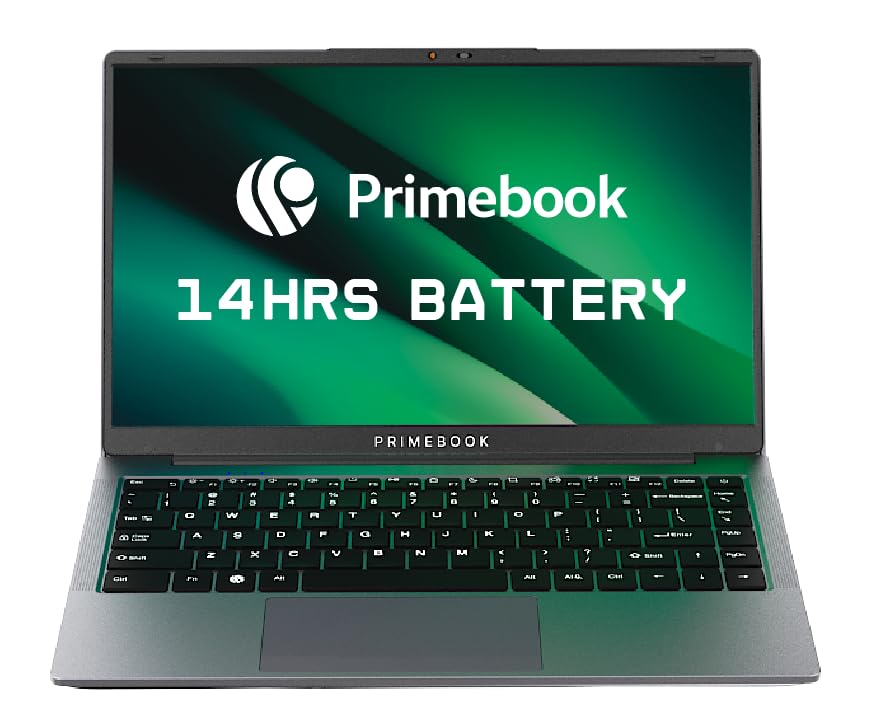
When You Want the Fastest Laptop in the Budget Range — This Is It
This is the most powerful laptop on your list – it’s the only one that feels fast, smooth, and modern.
The Helio G99 processor is far superior to any Celeron chip.
The IPS Full HD display brings it all to life.
UFS storage offers blazing fast, processor-level speed.
Key Specs
- MediaTek Helio G99
- 8GB RAM
- 128GB UFS Storage
- 14.1-inch Full HD IPS Display
- PrimeOS (Android-based)
Best for
Great for students, creatives, light multitasking, online classes, OTT viewing, and processor-intensive work.
Why choose this (simple reason)
If speed is important to you, and you hate lag, this is the only laptop under ₹20,000 that feels like “new”.
Confidence-boosting part
You’ll feel the difference the moment you start using it – apps open faster, pages load faster, and everything runs smoother.

A Value-Packed Laptop That Gives You More Storage Than Most Phones
This model offers the required amount of storage capacity in this price range. It is ideal for students and professionals who need to keep files, videos and documents on their laptop.
With Windows 11 and 8GB of RAM, it runs smoothly and handles everyday tasks well.
Key Specs
- Intel Celeron N4020
- 8GB RAM
- 512GB SSD
- Windows 11 Home
- 14-inch Display
Best for
It is ideal for office users, administrative tasks, students with a lot of files and basic productivity needs.
Reason to choose
You don’t have to worry about running out of space — you don’t have to delete files, use an external drive, so you get peace of mind.
Reason to boost confidence
If storage is important to you, this is a great choice under ₹20,000.
Comparison Table – Best Laptops Under 20,000
A Quick View That Saves 30 Minutes of Research
| Acer Aspire 3 A311-45 | Primebook 2 Pro 2025 | ULTIMUS APEX | |
|---|---|---|---|
| Processor | Celeron N4500 | Helio G99 | Celeron N4020 |
| RAM | 8GB | 8GB | 8GB |
| Storage | 512GB SSD | 128GB UFS | 512GB SSD |
| Display | 14" HD | 14.1" FHD IPS | 14" |
| OS | Win11 | PrimeOS | Win11 |
| Best For | Stability, office work | Speed, apps, smooth experience | Storage-heavy users |
This table removes confusion and highlights what each model truly excels at.
Deep Laptop Buying Guide (Processor, RAM, Display, Storage)
Processor – Simple Explanation
Think of the processor as “the speed at which your laptop thinks.”
- Celeron N4500/N4020 → Slow and quiet
- Helio G99 → Fast and responsive
Choose based on how much speed you need.
RAM – Simple Explanation
RAM shows how many tasks your laptop can perform without lag.
A minimum of 8GB of RAM is essential for good performance in 2026 – that’s it for all three of your laptops.
Storage – Simple Explanation
Storage determines how quickly things open on your laptop.
- SSD → Fast loading
- UFS → Fast loading
- HDD → Old and slow
You have both SSD and UFS on your list – both are good for budget laptops.
Display – Simple Explanation
The display affects your eyes, comfort, and long-term use.
- IPS Full HD (Primebook 2 Pro) → Very good quality
- HD panels (Acer, Ultimus) → Basic but usable
Choose based on how much time you’ll be working in front of the screen.
Battery life – simple explanation
Expect 5–7 hours of battery life.
It’s generally unrealistic to expect more than this at this price.
Build quality – simple explanation
What you get:
- Plastic body
- Lightweight design
- Simple look
Nothing about this feels premium — it’s average for the price.
FAQs
Are laptops under ₹20,000 worth buying in 2026?
Yes, if your needs are basic. They can handle online classes, browsing, meetings, and documents without trouble.
Can I use these laptops for gaming?
No. Only very light games may work. This price range is not made for gaming.
Which is the fastest laptop under ₹20,000?
Primebook 2 Pro (Helio G99) — it has the fastest processor and best real-life performance.
Which laptop gives the most storage?
Acer Aspire 3 and Ultimus Apex — both come with 512GB SSD.
Which one is best for students?
Primebook 2 Pro → for speed and good display
Acer Aspire 3 → for Windows and stable useCan these laptops run coding tools?
Basic coding tools → Yes
Heavy IDEs → No
Use light and simple coding environments.How long do laptops under ₹20,000 last?
They usually last 3–4 years with normal everyday use.
Windows or Android-based OS — which is better?
Windows → good for normal software and traditional apps
PrimeOS → fast, smooth, app-like experience
Choose based on how you work.
Best Choice Under 20K for Each Type of User
Your Final Decision-Making Shortcut
To avoid confusion and overthinking, here is a very simple buying guide:
Best for speed → Primebook 2 Pro 2025
Those who don’t like lag and want fast and stable usage throughout the day can opt for this.
Best for stability → Acer Aspire 3 A311-45
If you want a hassle-free, reliable Windows laptop, then go for it.
Best for storage → Ultimus Apex
If you need big storage without spending a lot of money, then this is the right choice.
Best All-Rounder Under ₹20,000 (2026 Winner)
Primebook 2 Pro 2025
It is fast, smooth and comes with a modern display, making it the best overall experience under ₹20,000.